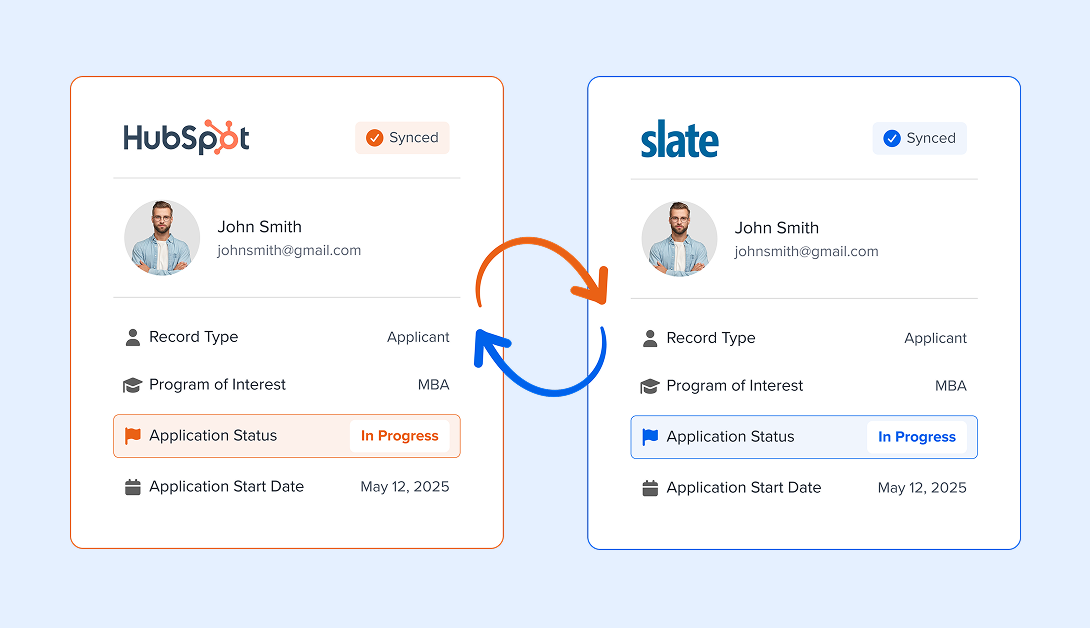
Automatically
sync data
between
HubSpot and Slate

The two most powerful tech platforms in higher education.
One simple app: DD Sync.
Yes,
HubSpot and Slate
can
integrate.
We've created a unique solution that makes working
between these two platforms easier, faster, and
cleaner: DD Sync.
DD Sync is the first of its kind — a two-way integration that enables your team to
better leverage HubSpot's marketing automation software and Slate's enrollment
and student success management tools.
How
it works
The Slate ↔️ HubSpot integration automatically pulls contact info from Slate queries and HubSpot’s database to share contact info across platforms. The app enables tracking across the full prospective student journey — from initial point of contact to consideration all the way through decision and beyond.
All your questions
answered
The Slate ↔ HubSpot integration automatically pulls contact info from Slate queries and HubSpot’s database to share contact info across platforms. The app enables tracking across the full prospective student journey — from initial point of contact to consideration, all the way through decision and beyond.
No matter how your institution uses HubSpot or Slate, the integration will allow you to automatically:
- Sync contacts and map contact fields between HubSpot and Slate, like Name and Contact Info, Application Status, Program of Interest, Decision Status, and more.
- Trigger targeted communications out of HubSpot based on information from Slate, like a student’s application status or program of interest.
- Nurture leads in HubSpot to attend an event, engage with blog or premium content, schedule a meeting with an admissions representative, and automatically remove leads from marketing communications as soon as they’ve started the application process in Slate.
- Add, edit, or remove fields to be synced in one or both directions across Slate and HubSpot.
HubSpot is a marketing automation platform with a suite of tools that enables institutions to develop and promote blog and premium content, send targeted and personalized emails, automatically trigger advanced behavior-based outreach, track lead engagement and attribution, and much more.
Slate is a CRM that manages the prospective student’s application journey, engages students to increase retention, and cultivates alumni and advancement community.
The Slate ↔ HubSpot integration allows you to leverage tools from both platforms mentioned above without having to manually export and upload lists across platforms on a regular basis.
Ah, that happens to be our favorite question. So glad you asked. Simply schedule a demo!
In order to get your Slate ↔ HubSpot integration account onboarded and set up, there's a one-time $15,000 implementation fee.
Beyond implementation, there are three monthly subscription options available depending on your institution's contact volume, syncing frequency, and number of fields being mapped.
Package Options
$15,000/one-time
$149/month
Foundational syncing for connected enrollment marketing
What you get:
- weekly syncing frequency
- up to 15 fields mapped
- 1k contact syncs / mo
$499/month
More speed, flexibility, and room to scale
What you get:
- daily syncing frequency
- up to 75 fields mapped
- 25k contact syncs / mo
$749/month
Advanced syncing for high-volume enrollment operations
What you get:
- hourly syncing frequency
- up to 150 fields mapped
- 100k contact syncs / mo
Our partnership with Direct Development has been outstanding. We appreciate the insights they bring to our regular strategy meetings. Their team of subject matter experts is not only fun to work with but also deeply committed to our success — helping us sharpen our approach to enrollment marketing.
Ronnie Stuart
VP of Enrollment & Marketing at Toccoa Falls University
In order to set up your account, our technicians will ask your team questions to better understand your institution’s ideal configuration. Next, we’ll work with your Slate and HubSpot admins to connect your platforms to your account. Finally, our team will configure your instance and set up auto-syncing across platforms. The process takes anywhere from 5-10 weeks from start to finish.
For more information, see the Onboarding Process Knowledge Base article.
Your institution will be given access to your Slate ↔ HubSpot integration instance, where you’ll be able to log in and add/edit field mappings, pause syncs, review sync history, and reschedule or pause syncs.
The integration can trigger the transfer of data to occur hourly, daily, or weekly, depending on your subscription.
For Slate, you’ll need permission to create queries and set up those queries as a web service, create a service account user, and create custom source formats. For HubSpot, you’ll need permission to create/edit contacts, import/export contacts, and connect 3rd party apps.
Currently, the integration is exclusively a contact-syncing tool. The app itself does not provide analytics, but it allows for syncing of contact information across HubSpot and Slate to better utilize those platforms’ analytics tools.
If you’re interested in getting started with HubSpot, schedule a demo, and our team can walk you through the process of getting started on your own HubSpot instance!
The integration app never houses or retains contact data from either the Slate or HubSpot platforms. It only serves to facilitate the passage of contact data between the two platforms. The Slate ↔ HubSpot integration uses REST API principles, which includes HTTPS protocols, Transport Layer Security (TLS) encryption, and stateless client-server architecture. Any account information stored on the integration servers is also fully encrypted.
A single Slate ↔ HubSpot integration instance can be used to connect any number of contacts from a single instance of Slate to a single instance of HubSpot, and vice versa. If your institution uses multiple Slate or HubSpot instances, a separate instance of the Slate ↔ HubSpot integration should be set up for each set of Slate<>HubSpot instances.
No, the current version of the Slate ↔ HubSpot integration product only enables a single-tenant environment. A feature on the product roadmap involves expanding functionality to allow for a multi-tenant environment in which multiple users could be invited to the same instance with customizable permissions per user.
Users will be able to configure the syncing parameters and limit the number of contacts going to and from HubSpot. By default, newly created contacts in HubSpot via the Slate ↔ HubSpot integration will be created as non-marketing contacts, and thereby avoid spikes in billable contacts. Workflows within HubSpot will need to be set up to set them as marketing contacts to enable the sending of marketing communications to those contacts.
If there are fields in Slate and in HubSpot indicating opt-out status, yes!